Gemini Prompt Examples: 18 Copy-Paste Blocks That Use Your Files
The 18 gemini prompt examples below are sorted by what you hand over with them. Four need nothing but the chat box. Four point Gemini at your own material: a document, a sheet, an email thread. Four start from a long PDF, a transcript or a slide deck. Three ask for current web sources. Three are image prompts, one of them for a photo you already have. Every entry opens with a Give it: line naming the input, so you attach the right thing before you press send. Anything in [square brackets] is yours to fill in. Jump to the group that matches the file open in front of you.
18 Gemini prompt examples, grouped by what you hand over
The reason a pasted prompt comes back generic is usually the input, not the wording. A prompt that says "summarise this report" with nothing attached has to invent a report. The five groups below fix that at the first line of each entry, and the prompt text itself always states the output format, because that's the part that decides whether you can forward the answer or have to rebuild it.
Prompts that need nothing but the chat box
Text in, text out. These four are the baseline, and they're the only ones on this page that behave the same in any chat model, so use them as a sanity check if something odd is happening with your uploads.
- Study guide builder: Give it: nothing but a topic. Paste:
Act as a subject tutor. Build a study guide for [topic] at [exam or level]. Start with a 10-line summary of what gets tested, then 8 key terms with one-sentence definitions, then 12 practice questions ordered easy to hard. Put all answers in one block at the end so I can cover them while I work.
- Cold email rewriter: Give it: your current email, pasted under the prompt. Paste:
You are a B2B copywriter. Rewrite the email below for a [recipient role] at a [company type]. Return exactly three subject lines under 45 characters, then one body under 120 words, then one line naming the assumption I'm making about this reader. Plain tone. No exclamation marks, no "hope this finds you well".
- Error explainer: Give it: the error text plus the ten lines around it. Paste:
Act as a senior [language] developer. Below is an error and the code that produced it. State the cause in two sentences before you suggest any fix. Then the corrected code, then one line on how to spot this class of error next time. If the cause is ambiguous, give the two likeliest causes and the check that tells them apart.
- Meeting notes to action items: Give it: your raw notes, however messy. Paste:
Turn the notes below into a table with four columns: action, owner, due date, blocked by. One row per commitment. Where an owner or date was never stated, write TBC. Under the table, list everything that was discussed and left unresolved.
Prompts that point Gemini at your own files
Two routes in. Upload the file to the chat, or point Gemini at the file in your Drive. For the second route, Google's help page says the connected Workspace app lets Gemini "Summarize, get quick answers, and find information from Google Workspace services like Gmail, Docs, and Drive", provided you're signed in with the same account you use with Workspace and Keep Activity is on, with work and school accounts also needing an administrator to enable app connections first. Gemini accepts common document uploads, though large files may be rejected. Split a monster file before you start.
- Long document to one-page brief: Give it: the document in your Drive, or the file uploaded to the chat. Paste:
Read the attached document and write a one-page brief for [audience]. Four sections: what this is, what it recommends, decisions needed from me, open questions. Each item in "decisions needed" must name who decides and by when, using only what the document states. Add no recommendations of your own.
The house SEO Content Brief prompt does the same job for a content plan. - Spreadsheet export reader: Give it: the exported sheet, CSV or spreadsheet file. Paste:
Here is a data export. Describe what each column holds in one line. Then name the three columns worth charting for [goal], with the chart type for each and why. Then flag every column where rows look empty, inconsistent or wrongly typed, with row numbers.
If the export needs tidying first, the Data Cleaning Assistant prompt handles that pass. - Reply drafted from a thread: Give it: the email thread, forwarded in or opened from your mail. Paste:
Read the thread. Draft my reply as [your name], [your role]. Match the formality of the most recent message from [sender]: short unpunctuated lines get short unpunctuated lines, formal gets formal. Answer every question asked. In square brackets at the end, list anything I have to confirm before this goes out.
- Two versions, one diff: Give it: both files, attached in the same message. Paste:
Compare version A and version B of this document. List only what changed. For each change: the old wording quoted, the new wording quoted, one line on why it matters to [audience]. Ignore formatting and typo fixes. Finish with a plain verdict on whether the substance moved.
Prompts that start with a transcript, a slide deck or a very long PDF
Length is the whole point of this group. Google's documentation puts the standard context window at 1 million tokens, with retrieval above 99%, which is why a full report can go in whole and a question about something buried deep in it still lands. One caution, though: you can't check an answer you can't locate. Every prompt here asks for the page or the timestamp beside the claim, and the habit worth keeping is to open two of those locations yourself before forwarding anything.
- Transcript to timestamped notes: Give it: the transcript of a video or call, pasted or uploaded as a text file. Paste:
From this transcript, write notes under topic headings, keeping the timestamp where each topic starts. Then a "skip to" list: five lines, each a timestamp plus a six-word reason to jump there. Quote claims word for word instead of paraphrasing them.
- Chapter-by-chapter on a long PDF: Give it: the full PDF, uploaded. Paste:
Summarise the attached document section by section, 60 words each, in document order. Then list the questions a reader of this document would expect answered and which it never answers. Then list every claim made without evidence, with the page number for each.
- Every figure in a table: Give it: the report or accounts PDF. Paste:
Pull every number from the attached report into a table: figure, unit, what it measures, page it appears on. Keep the original rounding. Where the same figure appears twice with different values, give both rows and mark the conflict. Calculate nothing I didn't ask for.
- Deck to speaker notes: Give it: the slide file, uploaded. Paste:
For each slide in the attached deck, write speaker notes of 70 words maximum: one sentence naming the point of the slide, then the evidence, then the line that hands over to the next slide. Head each block with the slide number and title. Where a slide carries a chart, say aloud what the chart shows.
Prompts that ask for live sources instead of memory
These three tell Gemini to work from current web information and to admit its gaps out loud. Answers may include links to what was used. Treat any link as a bonus and open it. Multi-step research modes exist and access varies by plan, so each prompt below also runs as ordinary chained prompting: ask for the sub-questions first, then send the answers back for the write-up.
- Competitor scan with receipts: Give it: three names and a market. Paste:
Using current web information, build a table comparing [company A], [company B] and [company C] on pricing, target customer, headline claim and one recent public change. Every cell stating a fact carries the URL you took it from. Where a figure can't be found, write NOT FOUND. Never estimate.
- Research brief that shows its method: Give it: the question, plus a scope line. Paste:
Research [question] for [audience]. Work in visible steps: list the sub-questions you'll answer, answer each from current sources, then write a 150-word brief. Close with two sections, "what I could not find" and "where sources disagreed". Name the date of the newest source you used.
- Fact-check pass on your own draft: Give it: the draft, pasted or attached. Paste:
Check every factual claim in the text below against current web information. Return a table: claim, verdict (SUPPORTED / DISPUTED / UNVERIFIED), source URL, one-line note. If you cannot find a source, write UNVERIFIED. Don't rewrite my text and don't delete claims.
Gemini prompts for images: generate one, or change one you already have
Two jobs, two prompt shapes. A new image wants subject, setting, lighting, style and aspect ratio stated. An edit wants a preservation list, because a model asked to change a background will cheerfully redraw the face as well. Filling in fields is faster than writing a paragraph for most people, and the image prompt generator builds the first kind; the same brief carries across to the Midjourney prompt generator if you work in both.
- New image from a filled-in brief: Give it: nothing but the completed block. Paste:
Create an image of [subject] in [setting]. Lighting: [e.g. low side light, late afternoon]. Style: [e.g. 50mm photograph, flat vector, ink sketch]. Mood: [mood]. Aspect ratio [16:9 / 1:1 / 9:16]. Keep text and logos out of the frame.
- Photo edit with preservation rules: Give it: the photo, uploaded, one subject in frame. Paste:
Edit the attached photo: change [one element only, e.g. the background to plain studio grey]. Keep the face, hair, skin tone, body shape and clothing exactly as they are. Don't smooth skin, don't alter the expression, don't crop. Light the new background to match the direction of light already on the subject. Return one image.
- Sketch or screenshot to clean diagram: Give it: a photo of your whiteboard, or a screenshot. Paste:
Redraw the attached sketch as a clean diagram. Keep every box, arrow and label in the same positions and relationships. Plain sans-serif labels, my spelling corrected, stray marks dropped. One accent colour on [the critical path]. Where a label is unreadable, leave it blank and list what you couldn't read.
The four-part shape behind every prompt above
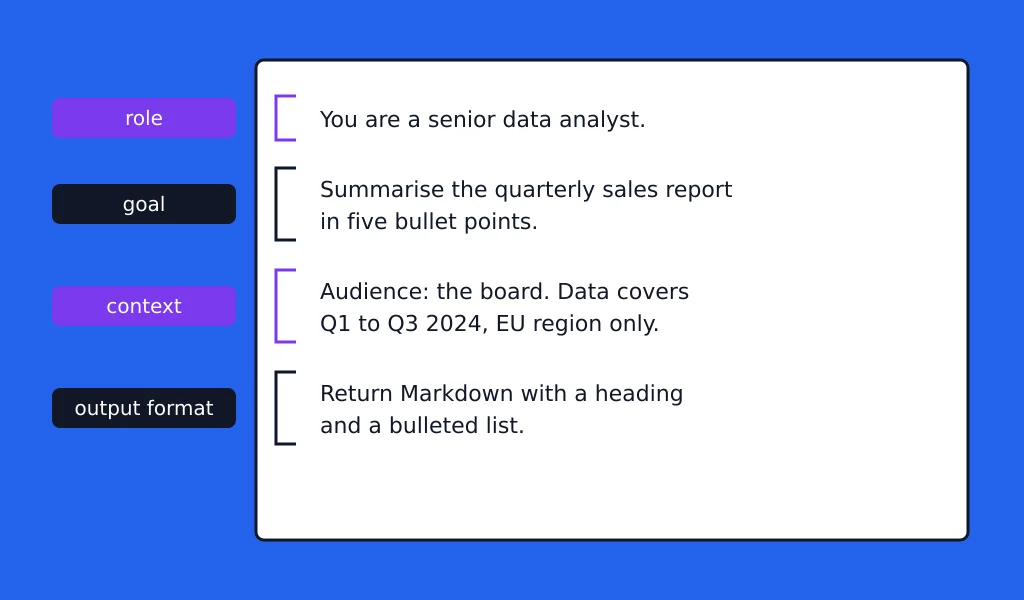
Four parts, in this order:
- Role: who Gemini is answering as, and for whom.
- Goal: the one outcome you'll judge the answer by.
- Context: the file, the numbers, the constraints, the audience.
- Output format: length, structure, what to do when information is missing.
Before, eight words: Write a LinkedIn post about our new pricing.
After:
You're a B2B content writer for a [industry] software company. Goal: get existing customers to open the new pricing page. Context: we moved from per-seat to usage-based billing; most accounts now pay less; three large accounts pay more and already know. Write one LinkedIn post, 120 words maximum, first line under 10 words, no hashtags, no emoji, ending on a question.
Output format is the part most people skip, and it's the part that decides whether the answer goes straight into your document or gets rewritten by hand. Rough prompt already in hand? You can paste it into the prompt optimizer and see which of the four is missing.
Are Gemini prompts different from ChatGPT prompts?
Barely, in wording. The inputs change, and so does the line you add about sources and locations.
| What you are doing | Same in both | What to change for Gemini |
|---|---|---|
| Plain text tasks | Role, goal, context, output format, placeholders | Nothing. Paste it as is. |
| Working from your own files | The instruction wording | Add the Drive or upload step first, and name the file in the prompt so the right one is read. |
| Working from a long document | Section-by-section requests | Send the whole file in one go and ask for page numbers beside each claim. |
| Asking for sourced answers | The UNVERIFIED rule | Say "using current web information" explicitly, and ask for the URL in a column of its own. |
| Image work | Subject, setting, lighting, aspect ratio | For edits, list what must stay untouched before you say what to change. |
Role prompts transfer unchanged: "act as a recruiter and interview me for [position]" behaves the same in either window. The specs are where the real gap sits, and you can read Gemini 2.5 Pro vs GPT-4 side by side if you're deciding which to pay for.
Frequently asked questions
Short answers to the things people search alongside this page.
What are the best Gemini prompts?
The ones that name their input. A prompt that says "act as a financial analyst and summarise this quarterly report, page numbers beside every figure" beats "give me financial insights" every time, because the second has nothing to read. Judge a prompt by three things: does it assign a role, does it state the output format, and does it say what to do when the information isn't there. If all three are present, it's a good prompt whatever the subject.
What should I write in a Gemini prompt?
Role, goal, context, output format. Then one line covering failure: "where a date was never stated, write TBC" or "if you can't find a source, write UNVERIFIED". That line is what stops the answer from reading as confident and being wrong.
What is the trending prompt for Gemini?
Single-photo restyles: you upload one picture and ask for it as a figurine, a studio portrait, a retro film frame, a particular outfit. The trend names change month to month and the prompt shape doesn't. Name the restyle you want, name the aspect ratio, then list everything that must stay identical, which is usually the face, the hair and the clothing. The preservation list is the whole trick.
What are 100 good prompts for Gemini AI?
There's no canonical hundred. Lists that size mostly repeat one idea in different clothes, and 18 blocks that each tell you what to attach will finish more work than 100 that don't. Our prompt library runs to a few hundred numbered role prompts if you want volume, sorted by category.
How long can a Gemini prompt be?
Longer than you'll ever need to type. Long instructions aren't the problem; vague ones are. Keep the instruction itself under roughly 300 words as a rule of thumb, and let the attachment carry the bulk.
Where to go next
Pick the entry that matches the file you already have open, fill the brackets, attach, send. For a task none of the 18 covers, the ChatGPT prompt generator will build the four-part block from a one-line description, and it pastes into Gemini fine. The prompt library holds the rest, sorted by category. Subscribe to the newsletter if you want new ones as they're added.